
Odoo inventory planning: know what to buy, what to move, and when
Smart Stock turns warehouse-level demand forecasts into reviewable buy and transfer decisions, then prepares the Odoo RFQs and internal transfers your team approves. Your buyer keeps the final say on every quantity.
Free tier, 50 products, no card required.
Odoo 16 to 19; the newest capabilities are released on Odoo 19 first. Runs on Odoo.sh and self-hosted Odoo. Odoo Online (SaaS) does not allow custom addons.
In production at

 IKAWA Chile SA
Inventory Control Tower
Working model. Demo data, real planning math.
| Product / warehouse | W1 | W2 | W3 | W4 | W5 | Next step |
|---|---|---|---|---|---|---|
| Week 1: projected 35 units, below safety stock. | Week 2: projected 0 units, projected stockout. | Week 3: projected 0 units, projected stockout. | Week 4: projected 0 units, projected stockout. | Week 5: projected 0 units, projected stockout. | Buy nowstockout in week 2 | |
| Week 1: projected 0 units, projected stockout. | Week 2: projected 0 units, projected stockout. | Week 3: projected 0 units, projected stockout. | Week 4: projected 0 units, projected stockout. | Week 5: projected 0 units, projected stockout. | Transfer + buystockout in week 1 | |
| Week 1: projected 9 units, below safety stock. | Week 2: projected 0 units, projected stockout. | Week 3: projected 0 units, projected stockout. | Week 4: projected 0 units, projected stockout. | Week 5: projected 0 units, projected stockout. | Transferstockout in week 2 | |
| Week 1: projected 174 units, healthy. | Week 2: projected 144 units, healthy. | Week 3: projected 114 units, healthy. | Week 4: projected 84 units, healthy. | Week 5: projected 54 units, healthy. | Review demandact by: before next run | |
| Week 1: projected 390 units, overstock. | Week 2: projected 376 units, overstock. | Week 3: projected 362 units, overstock. | Week 4: projected 348 units, overstock. | Week 5: projected 334 units, overstock. | Watchact by: no action needed |
- Healthy
- Below safety stock
- Projected stockout
- Overstock
- +n supply arriving
Swipe the timeline sideways. Tap any line to open its decision.Click any line to open its decision drawer.
A working model of the Inventory Control Tower. Switch views, change the horizon, compare committed supply with the recommended plan, and open any line. The math behind every cell is the product's real planning math, and eligible incoming supply is counted, per your planning rules, before anything new is recommended.
Niyu Smart Stock is inventory planning and replenishment decision support inside Odoo. It builds demand forecasts per product per warehouse, applies your lead times, order dates, safety days, units of measure, MOQ, and supplier rules, checks other warehouses before buying, and turns the result into one queue of decisions with the evidence attached.
The spreadsheet ritual becomes a review queue
Pick your seat at the table. The before is the spreadsheet routine; the after is what the module actually ships.
Without it
Export stock and sales to a spreadsheet, guess quantities, retype them into purchase orders, and hope nothing changed since Tuesday.
With Smart Stock
Open the queue, review the suggestion and its evidence, set your own quantity where you know better, and create the draft RFQs. Your number drives the order, and it survives the next forecast run.
Still yours: You still verify price, terms, and cash, and you still approve every order.
From demand signal to executed document
Six stages, one plan. Every screen below is the real module inside Odoo.
All screens below are the real module with demo data. Click any screen to enlarge.
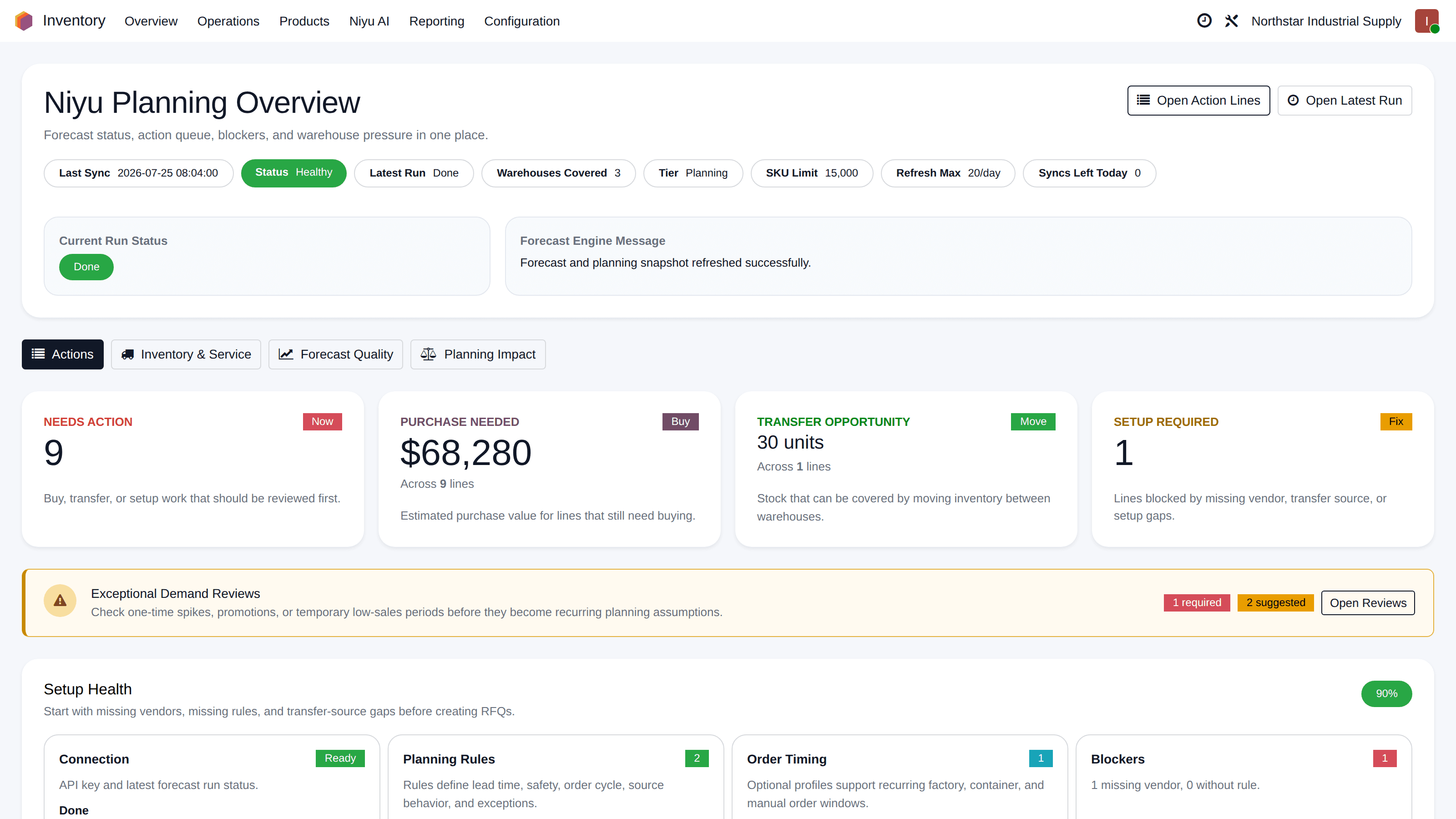
Risk surfaces sorted by act date, not by who noticed
Every scheduled run rebuilds the plan for every eligible product and warehouse pair. What needs attention rises to the top: urgent lines, the buy budget they represent, rebalance opportunities, and the setup gaps that block execution.
- Urgent Action Lines with projected stockout dates and act-by timing
- Buy budget needed, priced from suggested buys at standard cost
- Setup and data issues listed as work items, not silent failures
- Inventory health split into stockout, critical, healthy, overstock
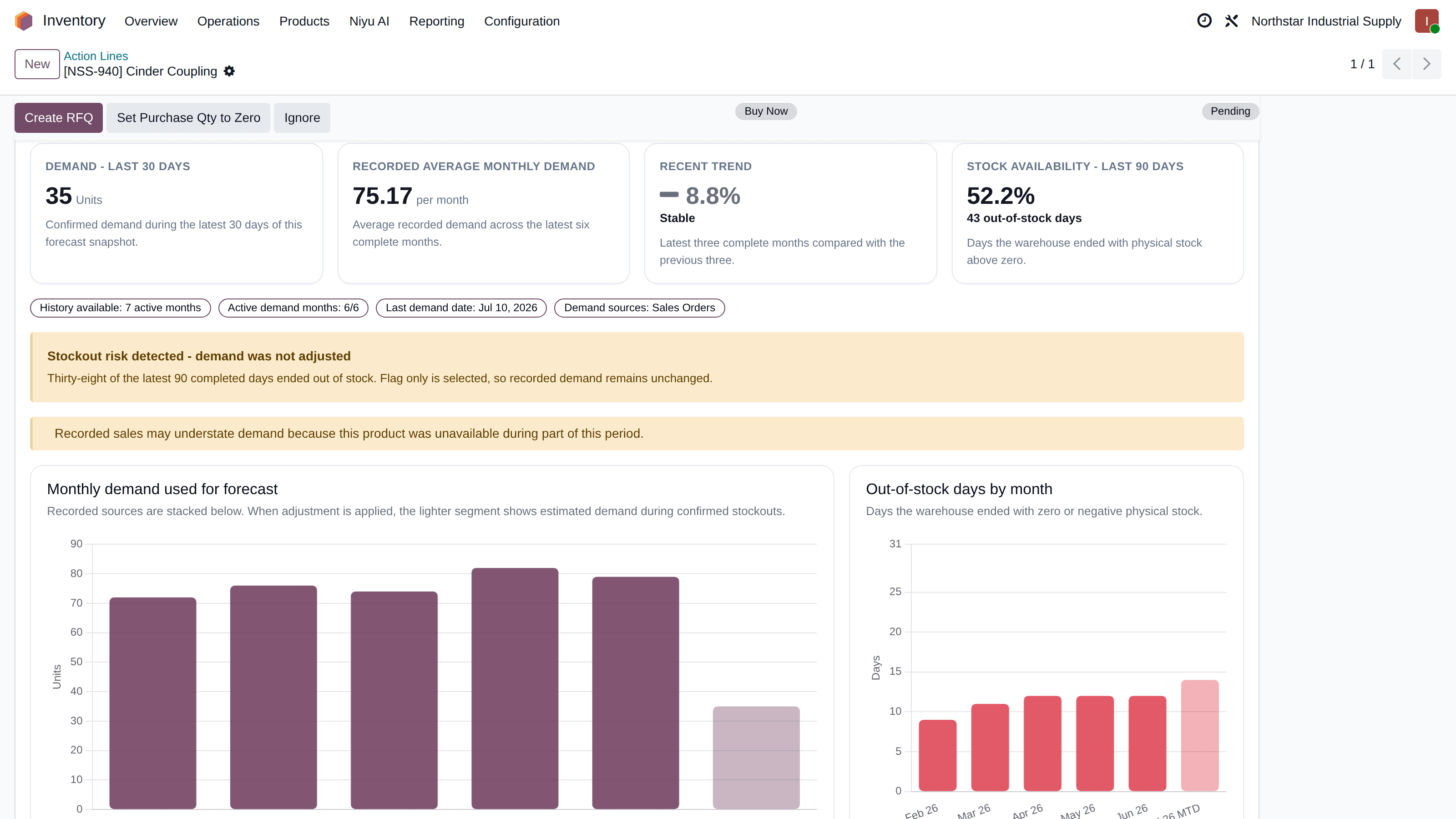
Audit the demand behind every number
Open any line and see the history the forecast learned from, computed locally in Odoo without spending a forecast refresh. Availability is reconstructed from your stock moves, so planners can tell empty-shelf periods apart from genuinely quiet demand. Estimating the demand you could not see stays opt-in and depends on backend support.
- Monthly demand split by source: sales orders, optional POS, inherited replacement demand
- Out-of-stock days and in-stock rate beside recorded sales
- Unusual spikes detected against a weekly baseline and held for review
- Backend model, reason, and confidence shown on Action Lines
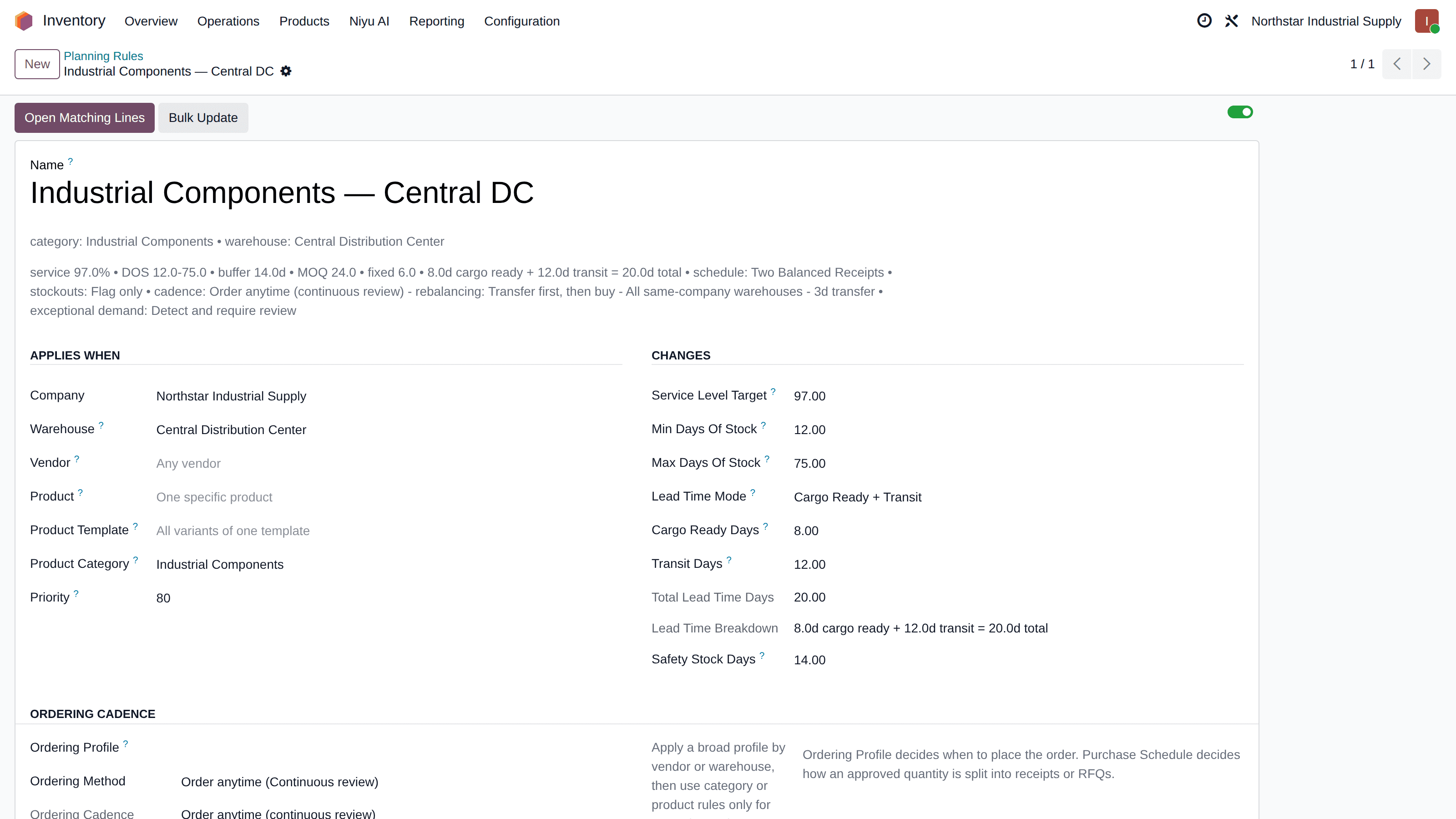
Policy that matches how you actually buy
Planning Rules scope by product, template, category, vendor, and warehouse, with the most specific rule winning. Coverage is set in days of stock, so targets scale with the forecast instead of freezing as unit thresholds.
- Min and max coverage as days of stock, safety stock as safety days
- Lead time typed in, or suggested from receipt history: average, median, P80, with sample count and confidence
- Ordering Profiles hold recurring vendor order dates with a preparation window
- Bulk rule import for catalogs too large to maintain one form at a time
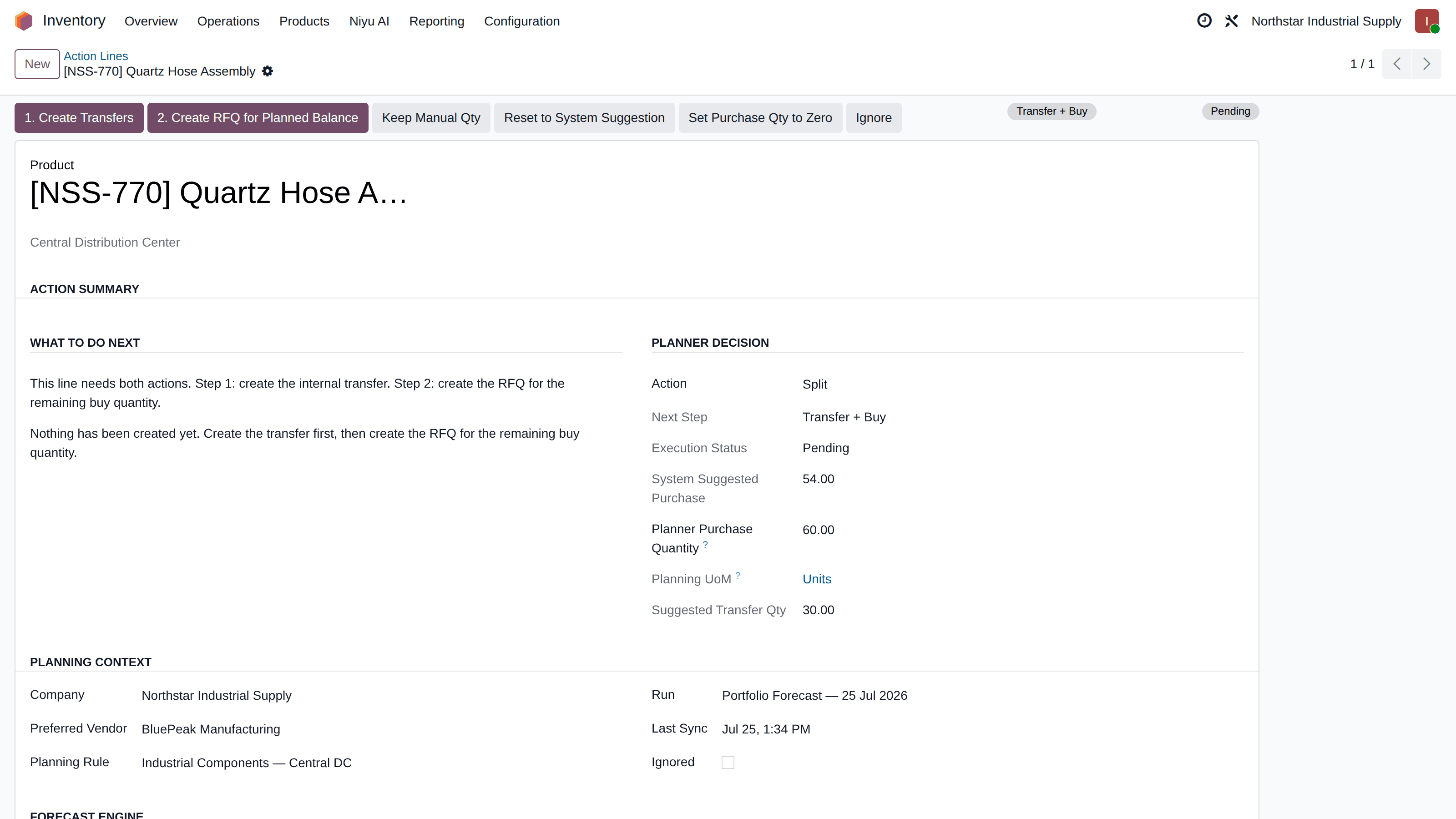
The system suggests. Your buyer decides.
Every Action Line keeps two quantities: the read-only system suggestion and the Planner Purchase Quantity your buyer controls. A manual value, including an explicit zero, drives the documents and survives later forecast runs. If a newer run changes the suggestion, the line is flagged for review instead of overwritten.
- Buy, transfer, transfer + buy, watch, or blocked-by-setup per line
- Planner Purchase Quantity editable until a confirmed PO locks it
- Purchase Review queue lists every manual decision in one place
- Quantities rounded to purchase UoM, pack size, MOQ, and order multiples
Documents in Odoo, not exports to retype
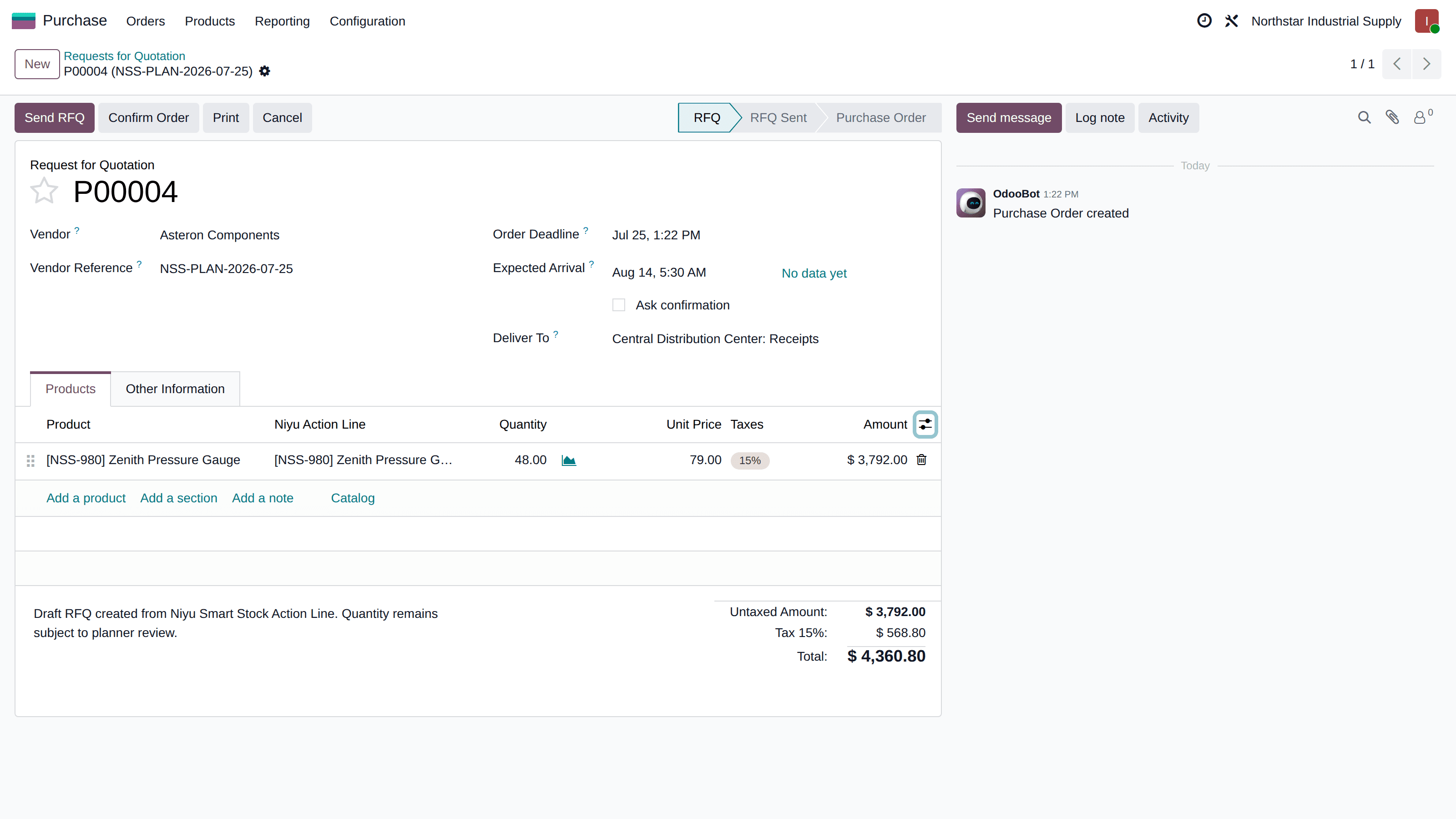
One click turns a decision into the real Odoo document, linked back to the line that created it. RFQs are created as drafts and grouped by vendor, warehouse, and currency. Internal transfers are created as confirmed pickings for the warehouse to process and validate.
- Draft RFQs only. Nothing is ever sent to a vendor automatically
- A linked confirmed purchase order is never modified behind your back
- Transfer quantities are rechecked against live donor stock at creation
- Created RFQs and transfers link back to their Action Lines
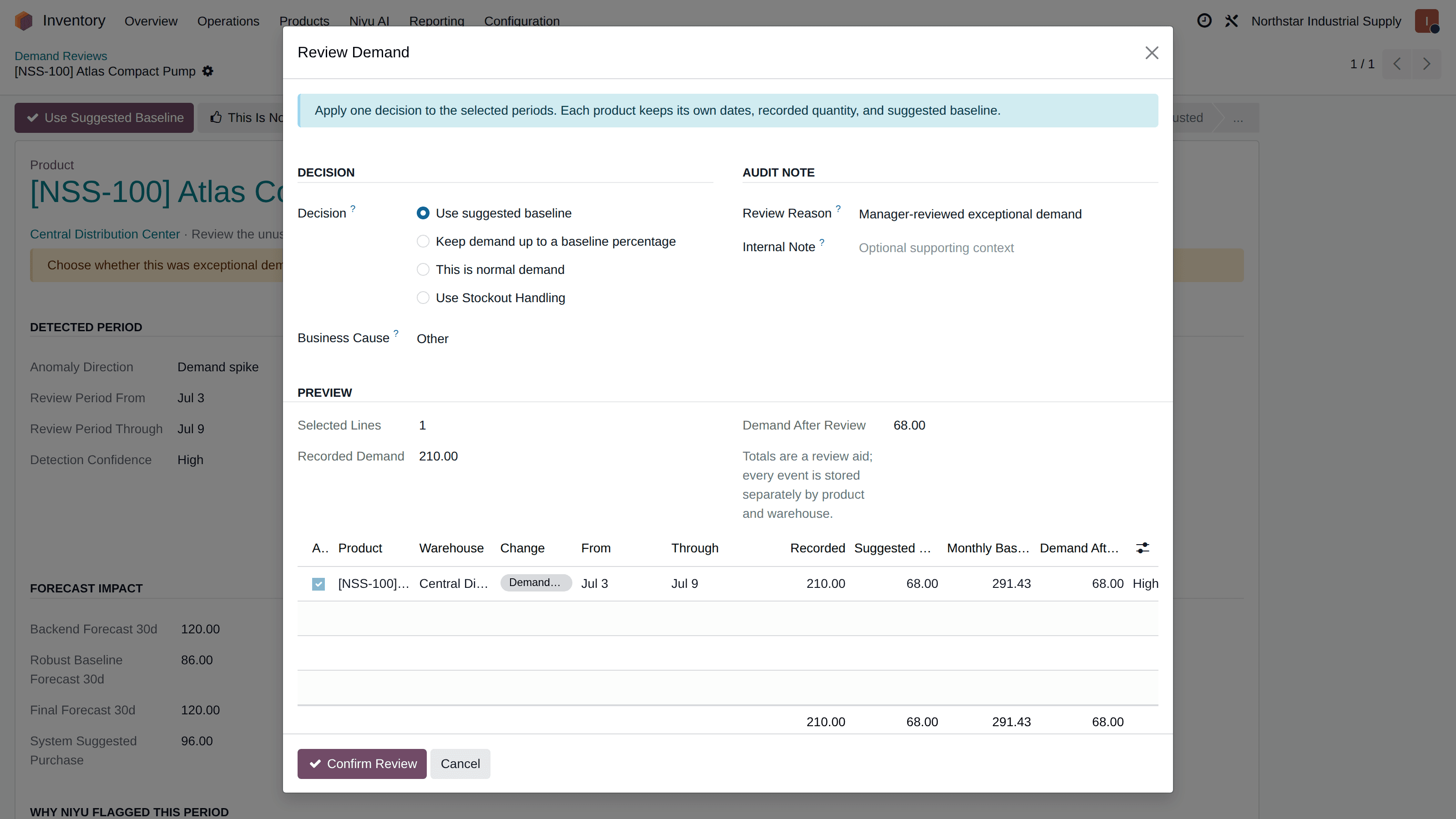
Accuracy measured after the fact, not assumed
Forecast snapshots are frozen when a run completes, then compared with what actually sold once the horizon closes. Model confidence and realized accuracy stay separate, and metrics state their own coverage instead of pretending day-one precision.
- How far off forecasts were (WAPE) and whether they lean high or low (bias), as snapshots mature
- Stockout-censored periods reported separately, not blended in
- Measurement starts the day you enable it, honestly labeled until mature
- Model confidence shown as the model's signal, never as proof of accuracy
How a forecast snapshot matures
Pending
Snapshot frozen at run time. The forecast horizon has not closed yet, so no accuracy is claimed.
Maturing
Actual sales are accumulating against the snapshot. Coverage is stated with every number.
Reliable
Enough horizons closed: WAPE and bias reported, stockout-censored periods listed separately.
Built for how suppliers and warehouses actually work
A recommendation that ignores order calendars, pack sizes, or a donor warehouse's own needs is just another number to correct. These constraints are part of the calculation, not an afterthought.
New to the underlying concepts? Start with our guides to reorder points and safety stock, or see how they become policy in the planning rules documentation.
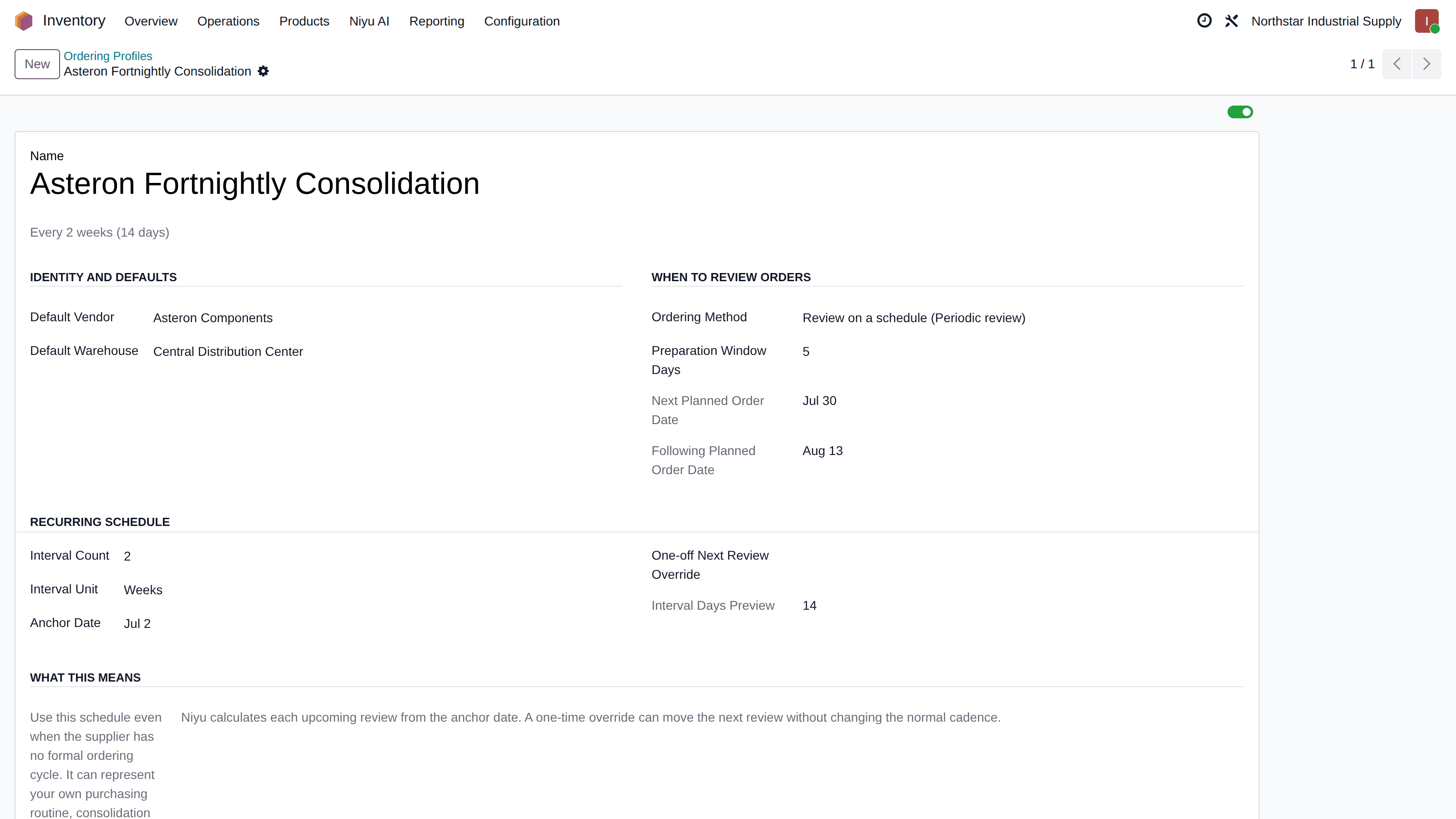
Vendors with order dates
Next order window: 14 Aug, prep by 11 Aug
Ordering Profiles hold the dates a vendor, container schedule, or factory actually accepts, with a preparation window. Purchases group onto those dates instead of dribbling out day by day, and a planned future buy never jumps the queue as Buy Now.
Quantities a supplier can fill
11.1 forecast → case of 12 → MOQ 100 → order 108
Forecasts are decimal, orders are not. Quantities convert to the purchase unit of measure, round to pack sizes and order multiples, then apply MOQ and supplier minimums. The adjustment is visible, so a buyer sees when constraints raise the buy above raw need.
Lead times from receipts, not guesses
Vendor Helvex: median 19d, P80 23d, 14 samples
A wizard reads your actual receipt history per vendor and warehouse and suggests average, median, and P80 lead times (the lead time your receipts beat 80 percent of the time) with a confidence rating. You apply or ignore each suggestion. Nothing edits your vendor records silently. Cargo-ready plus transit mode covers import flows.
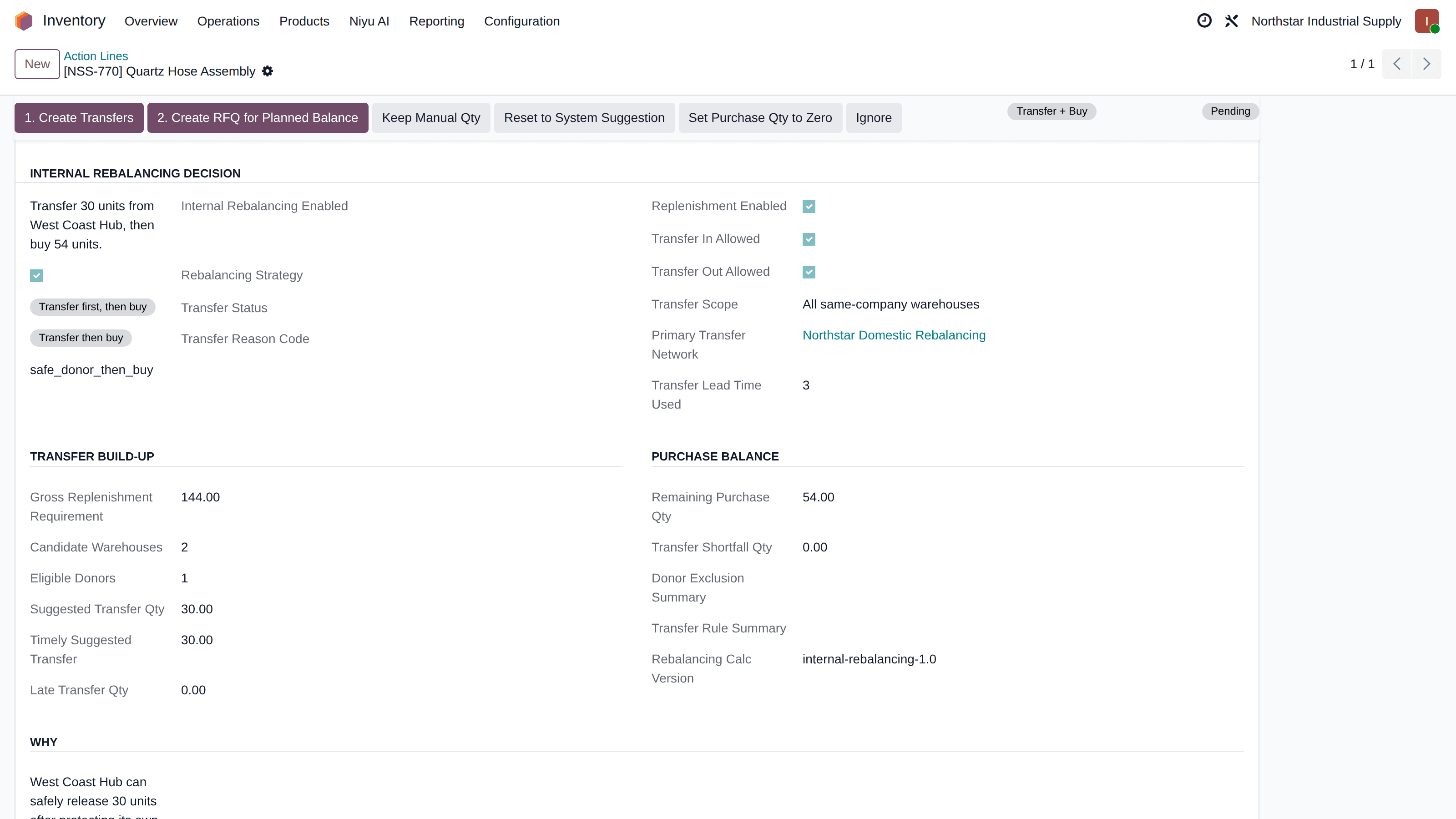
Rebalancing that protects the donor
North sends 70, East sends 36, Coastal excluded
When internal rebalancing is enabled and a permitted route exists, planning counts only stock above each donor's own planned requirement, allocates across multiple donors, and rechecks the safe quantity when the transfer is created. Transfers never cross a company boundary.
Decision support that knows its place
Automation you can audit beats automation you have to babysit. These boundaries are enforced in the module, not promised in a brochure.
Two quantities, one owner
The system suggestion is read-only. The Planner Purchase Quantity belongs to your buyer, drives the documents, and survives every later forecast run. An explicit zero is a recorded decision, not missing data.
No silent changes to confirmed orders
Once a linked purchase order is confirmed, Smart Stock refuses to modify it. Draft RFQs can be rebuilt from an updated planner quantity; confirmed documents are yours alone.
Exceptions wait for a person
Unusual demand is flagged with evidence and held for a manager's decision. Demand Events are durable records that supersede rather than mutate, and recorded Odoo orders never change.
Access levels that match roles
Users read the plan and the evidence. Managers run forecasts, set policy, resolve reviews, and create documents. Company-scoped policies, events, and transfer networks keep planning company-aware.
Exactly what leaves Odoo, and what never does
Sent for forecasting, outbound HTTPS only
- Product ID, warehouse ID, date, demand quantity
- Availability context for stockout-aware forecasting
Stays in your Odoo
- Stock on hand, incoming supply, lead times, planning rules
- Customer names, emails, addresses, invoices, payments
- Review decisions, planner quantities, RFQs, transfers
The forecast is calculated by the Niyu cloud service and returned to your database. No inbound access to your Odoo is required or requested. Payloads are temporary and deletable on request. See the privacy policy for retention details.
Two minutes, the whole loop
Forecast, review, decide, and create the documents, recorded in the real module.
Player not loading? Open the demo in a new tab.
In production, and validated in the open
Real operations run their purchasing on Smart Stock. The module ships with its validation evidence, not just its promises.
Liqa International Trading Co.
Distributes premium pet food and care products across Saudi Arabia, including Royal Canin since 1998. Runs Niyu Smart Stock to forecast demand and plan replenishment.
IKAWA Chile SA
Santiago-based importer and one of the principal suppliers of electrical products to national retail in Chile. Their Odoo inventory planning runs on Niyu Smart Stock.
“Using it for my 5 warehouse business for internal transfer before buy replenishment. Team connected on a call for free implementation. Replied timely.”
Lester · verified Odoo Apps review · June 2026
Validation snapshot · 25 July 2026
Updated with significant releases
Addon 19.0.26.7.24: installed on a fresh Odoo 19 database; 71 test methods and 93 assertions passed with no failures. Runs on Odoo.sh, self-hosted, and on-premise Odoo, including Docker.
Versions: dedicated addon branches for Odoo 16.0, 17.0, 18.0, and 19.0. Newest capabilities land on 19 first.
Scale checks: engineering benchmarks cover 14,000 product-warehouse pairs in forecast preparation. A benchmark, not a customer throughput guarantee; real speed depends on your database and plan.
A short setup, and an honest fit check
Install the module, paste your API key, run the initial sync, and set planning rules for the products that matter. Paid plans include an on-call setup session so the first recommendations are useful, not generic.
A strong fit when
- You purchase or move stock across one or more warehouses in Odoo 16.0 to 19.0
- Demand shifts enough that hand-maintained min/max rules drift out of date
- Buyers want evidence and control, not a black box that orders for them
- Stockouts have polluted your history and you need planning to see that
- Vendors impose order dates, MOQ, pack sizes, or long lead times
Probably not what you need if
- You need manufacturing planning: BOM explosion, capacity, or production scheduling belong to Odoo MRP
- A small, steady catalog is already well served by native reordering rules you barely touch
- Your Odoo master data has no vendors, lead times, or clean stock moves yet, and you cannot invest in fixing it
- Your server cannot make outbound HTTPS requests, which the forecasting service requires
Read the documentation before you commit
Installation, configuration, daily workflows, and troubleshooting. Start with the business problem playbooks to see how teams solve a specific planning problem.
Want to sanity-check your current thresholds first? Try the free reorder point calculator.
Every feature on every plan, priced by scale
Plans differ only by products, warehouses, and forecast horizon. The free tier is permanent, not a trial. Start free, upgrade when the catalog grows.
Free
$0/mo
For trying it out, and for very small catalogs.
- Up to 50 products
- Up to 2 warehouses
- 30-day forecast
- 1 scheduled + 1 Refresh Now per day
- Standard support
Add a manual refresh for $19/mo each per day.
Get your free API keyPro
$79/mo
Larger catalogs, more warehouses, and priority support.
- Up to 2,000 products
- Up to 3 warehouses
- 30-day forecast
- 1 scheduled + 1 Refresh Now per day
- Priority support
Add a Refresh Now for $29/mo each per day, as many as you need.
Choose ProBusiness
$249/mo
Bigger catalogs, more warehouses, and a longer forecast horizon.
- Up to 5,000 products
- Up to 4 warehouses
- 60-day forecast
- 1 scheduled + 1 Refresh Now per day
- Priority support
Add a daily refresh for $49/mo each, manual or scheduled.
Choose BusinessEnterprise
Custom
Above Business limits, with capacity sized to your operation.
- 90-day forecast, and longer on request
- More products and warehouses than Business
- Extra daily refreshes and computing capacity
- Configured to how your team plans
- Priority support
Every plan recalculates once a day on your schedule and includes one extra Refresh Now on demand. Additional daily refreshes can be added to any plan.
 256-bit SSL secureWe never see your card7-day money-back, cancel anytime
Prefer to buy through Odoo? View Niyu Smart Stock on the Odoo App Store.
Size your configuration in a minute
Above the Business limits, price follows your product count, warehouses, horizon, and refresh schedule. The estimate assumes maximum usage, so most operations pay less.
Count only the products you want demand forecasts for, not your whole Odoo catalog. Leave out the ones you never reorder.
Slider goes to 50,000. Type a larger number for bigger catalogs.
Count only the warehouses you want planned and balanced, not every stock location in Odoo.
How many extra times a day you want to replan, on top of the one scheduled run and one Refresh Now every plan already includes.
Additional refreshes can be used manually or scheduled at another time during the day.
This configuration fits the Business plan
$249/month
Billed monthly. All features included. Cancel or change plans anytime.
Asked by inventory teams, answered from the source
Does it replace Odoo's reordering rules?
It does not have to. Native rules are a good fit for stable products with maintained min and max values. Smart Stock adds forecast-driven planning, exception review, transfer-before-buy, and buyer-controlled execution for the products where static thresholds are not enough. Assign planning ownership per product during rollout so the two systems never order the same item twice.
Can it suggest a transfer instead of a purchase?
Yes. When another warehouse in the same company has stock above what its own plan requires, Smart Stock plans a transfer first, across multiple donor warehouses if needed. If transfers cover only part of the need, it splits the action: transfer what you have, buy only the remaining gap. Donor requirements are protected in planning and the safe quantity is rechecked when the transfer is created.
Does it create real purchase orders in Odoo?
It creates real Odoo documents your team controls. RFQs are created as drafts, grouped by vendor, warehouse, and currency, and linked back to the planning line. Internal transfers are created as confirmed pickings for the warehouse to process and validate. Nothing is ever sent to a vendor automatically.
Can I change the suggested quantity before the purchase order is created?
Yes. Every line keeps two values: the read-only system suggestion and the Planner Purchase Quantity you control. Your number, including an explicit zero, is what drives the RFQ. If a newer forecast changes the suggestion after you set a quantity, the line is flagged for review instead of being overwritten, and a Purchase Review queue lists every manual decision in one place. Once a linked purchase order is confirmed, the quantity is locked against further edits from the line.
What happens to the forecast when a product was out of stock?
Smart Stock uses your stock-move history to flag zero-sales days that appear to have been out of stock; reliability depends on how complete that history is. By default those periods are flagged, with out-of-stock days and the in-stock rate shown beside recorded demand. Estimating the demand you could not see is opt-in, applies only to confirmed stockout days, and depends on the forecasting service returning those fields for your plan. Planning rules can also ignore availability for made-to-order or seasonal products.
What's included in each plan, and is Free a trial?
Every plan includes all features and one scheduled refresh plus one Refresh Now per day; plans differ only by scale. Free covers up to 50 products, 2 warehouses, and a 30-day forecast, permanently, with no card required. Pro at $79/mo covers up to 2,000 products, 3 warehouses, and a 30-day forecast. Business at $249/mo covers up to 5,000 products, 4 warehouses, and a 60-day forecast. Enterprise covers a 90-day forecast, and anything larger.
What happens if my lead time or ordering cycle is longer than the forecast horizon?
The plan refuses to guess. When the returned forecast does not cover the full lead time plus order cycle, the periodic quantity is blocked and the line shows a horizon blocker instead of a number invented beyond the forecast. The fix is a longer forecast horizon (larger plans forecast further out) or a shorter ordering cycle.
Does it support multi-company Odoo?
Planning is company-aware: policies, demand events, and transfer networks are scoped by company, and transfers never cross a company boundary. For multi-company rollouts, validate the access design for your setup during implementation.
Which Odoo versions does it support?
Niyu Smart Stock ships as version-specific addons for Odoo 16.0 through 19.0. Its dependencies are core modules available in both Community and Enterprise. It runs on Odoo.sh and self-hosted Odoo, including Docker; it cannot be installed on Odoo Online (SaaS), which does not allow third-party addons with custom code. The capabilities shown on this page are validated on Odoo 19, so confirm edition, hosting, and feature fit for your version during setup. Your Odoo server needs outbound HTTPS access to the Niyu forecasting service; no inbound access to your database is required.
What data does it send?
The forecast request contains dated demand series: product ID, warehouse ID, date, demand quantity, and availability context, sent over outbound HTTPS. Stock on hand, incoming supply, lead times, and planning rules are applied by the module inside your Odoo after the forecast returns. Customer names, emails, addresses, invoices, and payment details are not part of the forecasting payload.
Compare it, or go deeper
Odoo demand forecasting guide
How reorder points, safety stock, and forecasts fit together for Odoo planning.
Smart Stock vs Odoo reordering rules
When native rules are enough, and when forecast-driven planning pays for itself.
Smart Stock vs Inventory Planner
Odoo-native planning against an ecommerce-first tool reached through middleware.
Smart Stock vs Netstock
Where each tool fits for Odoo operations, compared honestly.
Documentation
Setup, planning rules, action lines, and the full workflow reference.
Guides: demand forecasting, reorder points, safety stock, and multi-warehouse transfers.
Run it beside your current process
Start with 50 products on the free tier. Compare its recommendations with your own decisions for a few weeks, and approve nothing until the plan earns it.