
Niyu Smart Stock vs Odoo reordering rules
Odoo's reordering rules are a solid, free baseline. They top stock up when it falls below a number you set. The question is what happens when a static min and max can no longer keep up with real demand.
Smart Stock keeps the reorder-point idea you know, drives it from a forecast, and plans across warehouses. It runs alongside your rules, not instead of them.
 native modulepermanent free tierruns alongside your rules
 Inside Odoo
The difference in one paragraph
If you want the answer before the detail, here it is.
Odoo's reordering rules are a reliable threshold. You set a minimum and a maximum per product per warehouse, and when forecasted stock falls below the minimum, Odoo orders back up to the maximum. That is genuinely useful for steady products, and it is free. The limits show up when demand is seasonal or intermittent, when min and max have to be maintained by hand across a large catalog, when safety stock is really just the minimum you guessed, and when spare stock in another warehouse should move before you buy. Niyu Smart Stock keeps the reorder-point logic you already understand, but it forecasts demand per product and warehouse, sets days-of-stock targets and service-level safety stock, learns lead times from your receipts, and plans transfers across every warehouse before buying. It runs alongside your reordering rules, so you keep the simple ones and let Smart Stock handle the rest.
A forecast, not a fixed threshold
Predicts demand per product and warehouse, instead of waiting for stock to fall below a number you set.
Min and max that move with demand
Targets are days of stock sized to a service level, so they scale with the forecast instead of going stale.
Plans across every warehouse
Moves spare stock between warehouses before buying, with multi-donor allocation, not a preset route to one source.
How Odoo reordering rules actually work
A fair comparison starts with what native rules really do, not a caricature of them.
A reordering rule lives on a product, for one location, and holds a minimum quantity, a maximum quantity, and an optional quantity multiple. Odoo watches the product's forecasted stock, which is its current on-hand plus incoming supply minus outgoing demand from confirmed orders. When that forecasted figure drops below the minimum, Odoo proposes an order to bring it back up to the maximum, rounded to the multiple, along the product's route: buy, manufacture, or resupply from another warehouse.
The Replenishment dashboard, under Inventory then Operations, gathers what is due, taking order deadlines and lead times into account, and you click Order to create the purchase or manufacturing order. Visibility and horizon days let it look ahead at demand you already know about within a window. Lead time is the sum of values you maintain: the vendor lead time, a purchase security lead time, and days to purchase. A scheduler can run the rules automatically and create the orders up to the maximum.
Min quantity
Reorder when forecasted stock drops below this
Max quantity
Replenish back up to this level
Qty multiple
Round to a pack, carton, or pallet
Location
One rule per product per warehouse
Route
Buy, manufacture, or resupply from a warehouse
Where a static min and max hits its limits
None of this means reordering rules are bad. It means a fixed threshold can only carry you so far once demand and the catalog grow.
The numbers are static and manual
Min, max, and the multiple are values you type per product per location. They do not move when demand shifts, so on a growing catalog thousands of them quietly go stale.
It reacts, it does not forecast
The trigger is current forecasted stock, which Odoo computes from confirmed orders and incoming supply. It is a projection of what you already know, not a prediction of future demand, so seasonality and intermittent demand are not modelled.
Safety stock is whatever you put in the min
There is no statistical buffer sized to how variable demand and lead time actually are. The min is a manual guess, and the cost of guessing high is dead stock, the cost of guessing low is a stockout.
Cross-warehouse supply is a preset route
Resupply from another warehouse is a route to one chosen source, triggered by a 0/0 rule. There is no decision to move spare stock first when it is cheaper, and no allocation across several donor warehouses.
The same goal, reached two different ways
One waits for a line to be crossed. The other plans the decision from a forecast and the whole network.
reordering rulesThresholdReliable while demand is flat. The numbers are yours to keep current, and the decision is buy or a preset resupply.
 Smart StockForecast
A planned decision with the evidence attached, recomputed every day so it stays current on its own.
Side by side, on the points that decide it
Native rules are credited where they are genuinely the right tool. These rows are about what changes when planning is forecast-driven.
Native behaviour described from the official Odoo documentation. Sources: Reordering rules, Replenishment report, Inter-warehouse replenishment, Lead times.
What changes when planning is forecast-driven
The differences that matter most once a static min and max is no longer enough.
From a static min and max to a demand forecast
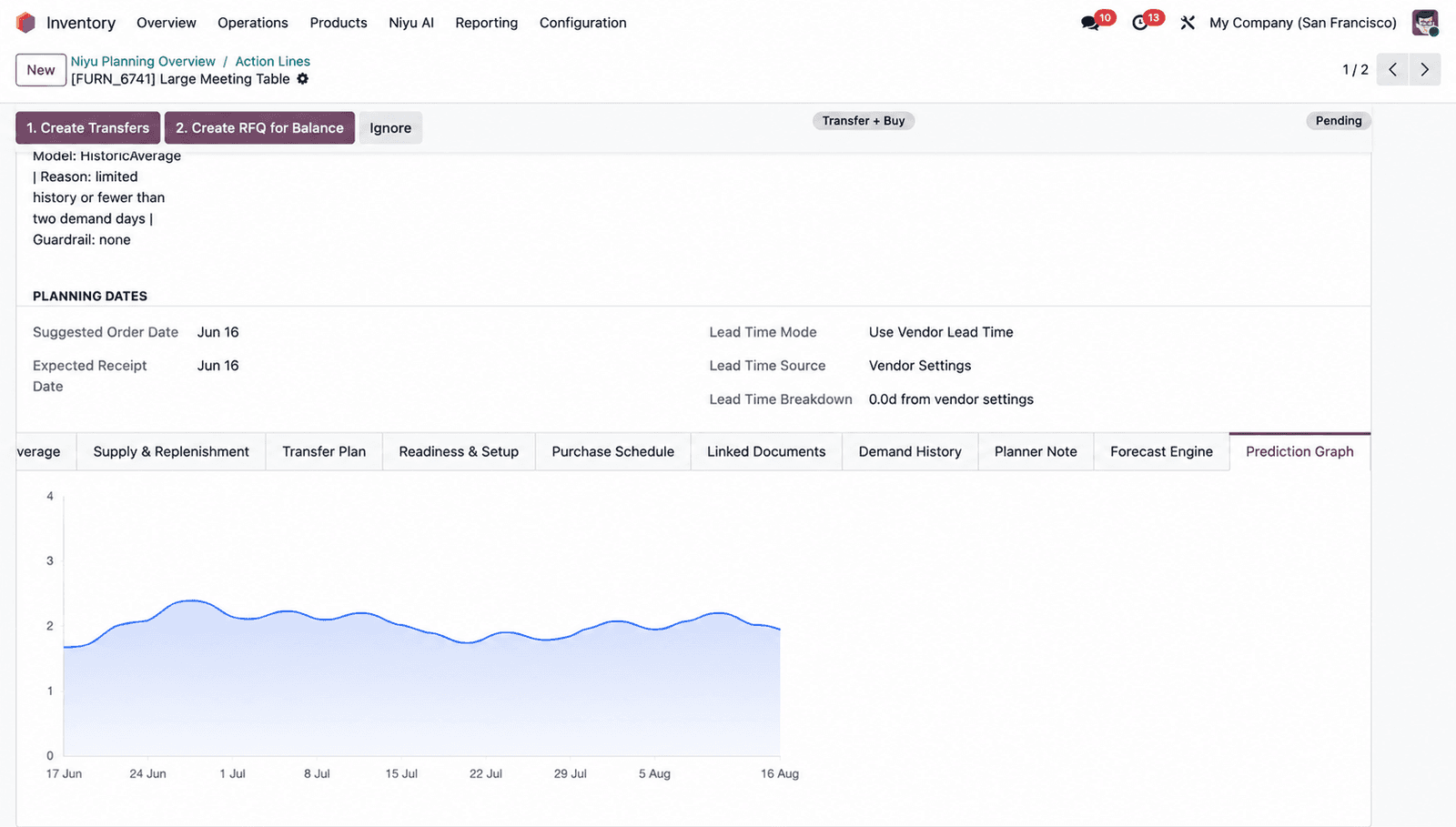
A reordering rule waits for stock to cross a line you drew, then tops it up. That works while demand is flat, but the line is your guess and it does not see next month coming. Smart Stock keeps the reorder-point idea you already understand and drives it from a forecast. It predicts demand per product per warehouse, routes a model per product for steady, seasonal, and intermittent lines, and shows the model, the reason, and a confidence score. The reorder point and the days-of-stock target then move with the forecast instead of waiting for you to edit a number.
 Inside Odoo
Min and max as days of stock, with real safety stock
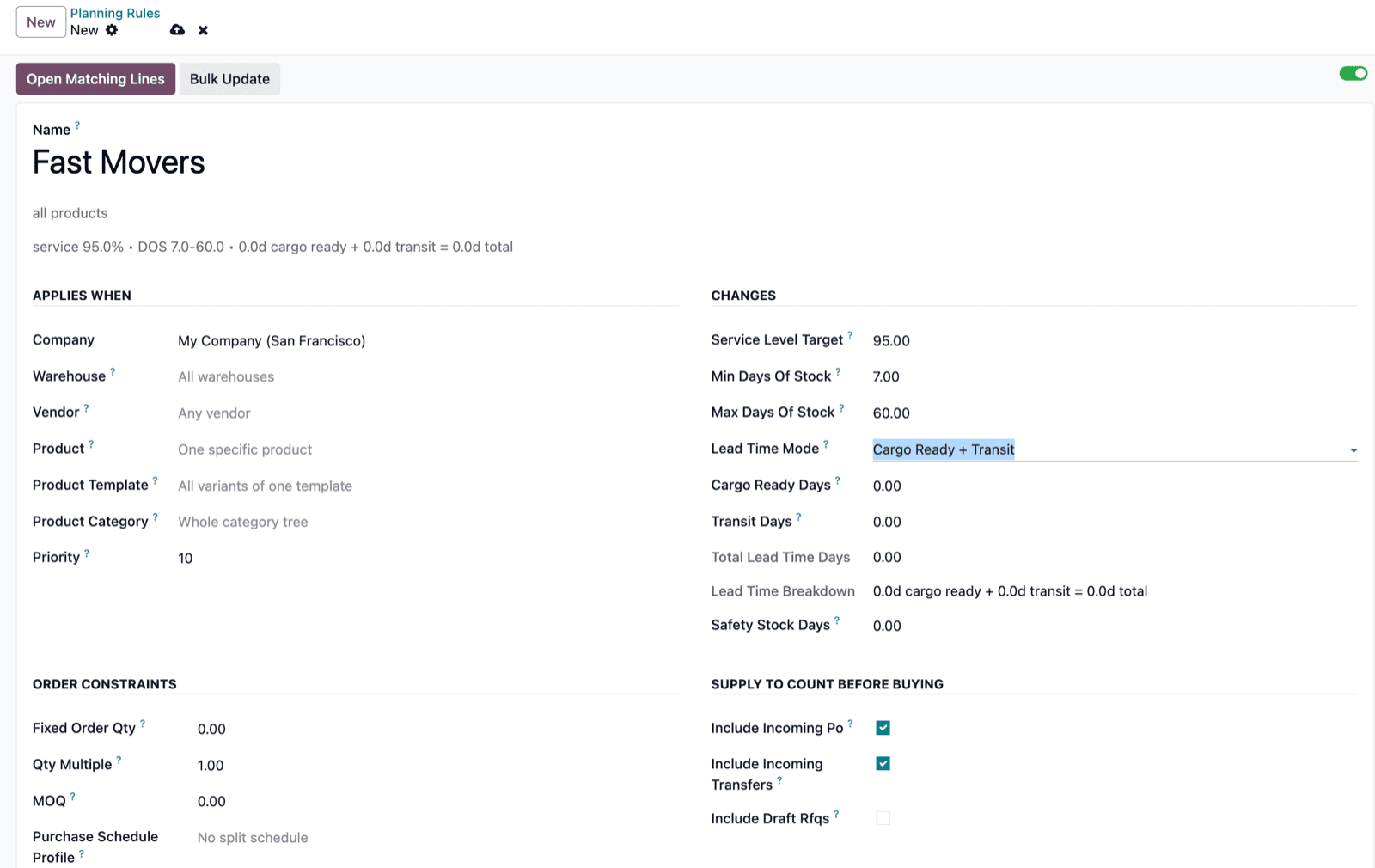
In native rules, safety stock is just the min you typed, and the max is another fixed number. Smart Stock expresses the same coverage as minimum and maximum days of stock, so the targets scale with demand on their own. Safety stock is sized from a service level you choose, so a fast, volatile mover and a slow, steady one do not carry the same blunt buffer. Planning Rules apply by product, template, category, vendor, or warehouse, and the most specific rule wins, so you set policy once for a family and override only the exceptions.
 Inside Odoo
Lead times learned from your receipts, not typed in
Odoo's lead times are numbers you maintain: vendor lead time, security lead time, days to purchase. They are only as good as the last time someone updated them. Smart Stock can learn lead time from your actual purchase receipt history, computing the average, the median, and the P80 per vendor and warehouse, with a confidence based on how many receipts it saw. It does not rewrite your vendor master quietly. It proposes a reviewable suggestion, and applying it updates a Planning Rule that you control.
 Inside Odoo
Transfer across every warehouse, then buy only the gap
Native resupply moves stock along a route you predefine to one source warehouse. It does not weigh a transfer against a purchase, and it does not gather spare stock from several warehouses. Smart Stock checks the whole network before it buys. It protects each donor's own coverage, takes only the surplus above that, and can pull from several donors at once. A fully covered shortage becomes a transfer, a partly covered one becomes transfer plus a smaller buy, and it rechecks live stock at the moment you create the move so a stale plan cannot overdraw a warehouse.
 Inside Odoo
A prioritized plan, not a flat reorder list
The replenishment dashboard lists what crossed its threshold. Smart Stock turns the day into a control room: urgent lines first, the buy budget those lines need, what can be rebalanced between warehouses, and what is blocked by a missing vendor or donor. Every line opens onto its evidence, the monthly demand by source, the out-of-stock days behind a quiet month, the model, and the recommendation math, so a planner approves with the reasoning in front of them instead of trusting a number.
 Inside Odoo
Which one should plan a given product
This is not all or nothing. The best setup often uses both, with each product planned by whichever tool fits it.
reordering rulesNative reordering rules are the right tool when
- Demand is steady and lead times are stable
- The catalog is small enough to maintain min and max by hand
- You run a single warehouse, or a simple preset resupply
- You want a free, built-in trigger and nothing more
A solid, free baseline for predictable products.
Smart StockNiyu Smart Stock earns its place when
- Demand is seasonal, intermittent, or growing
- You run several warehouses and move stock between them
- You want service-level safety stock and learned lead times
- You want the evidence behind every recommendation
A forecasting layer for the products a static min and max cannot keep up with.
It layers on, with nothing to rip out
Smart Stock does not switch your reordering rules off. You add a forecasting layer and decide, product by product, what it should plan.
It runs alongside your rules
Smart Stock is a planning layer, not a replacement. Your reordering rules keep working. Use it for the products where a static min and max is not enough, and leave the simple, steady SKUs as they are.
Nothing to migrate
It reads sales history, stock, and incoming supply straight from Odoo. There is no export and no rebuild. Install the module, paste an API key, and run the first sync.
Prove it on the free tier
Run it on the permanent free tier next to your current rules and compare the recommendations on products you know well, before you change how anything is planned.
You approve every order
Smart Stock drafts the Odoo RFQs and confirms the internal transfers. Nothing is sent to a vendor or validated automatically. Paid plans include on-call setup and a money-back guarantee.
Paid clients get on-call setup. We connect on a call to install the module, paste your API key, run the first sync, and set your planning rules so the first recommendations are useful from day one.
Questions Odoo teams ask
Does Niyu Smart Stock replace Odoo reordering rules?+
It does not have to. Smart Stock is a smarter planning layer that runs alongside native reordering rules. Many teams keep min and max rules for simple, steady products and let Smart Stock plan the products where seasonality, intermittent demand, multiple warehouses, or scale make a static threshold unreliable.
Does Odoo forecast demand on its own?+
Not in the predictive sense. Odoo's reordering rules use 'forecasted stock', which is a projection of your current position from confirmed orders and incoming supply. It tells you what you already know is coming, not what demand will be. Visibility and horizon days extend that view to known future demand within a window, but they do not predict it. Smart Stock adds an actual demand forecast per product and warehouse.
What is the real problem with min and max?+
Min and max are static numbers in units that you set and maintain by hand, per product per location. They do not move as demand shifts, the min doubles as your safety stock guess, and on a growing catalog thousands of them go stale. Smart Stock keeps the reorder-point idea but drives it from a forecast and expresses the targets as days of stock that scale on their own.
Can Odoo move stock between warehouses before buying?+
Through a preset 'resupply from another warehouse' route to one chosen source, triggered by a 0/0 rule. It does not weigh a transfer against a purchase or gather spare stock from several warehouses. Smart Stock checks the whole network, protects each donor's own coverage, allocates across multiple donors, and recommends a transfer, a purchase, or a split of both.
How is the safety stock different?+
In native rules, safety stock is effectively the min quantity you typed. Smart Stock sizes safety stock from a service level you choose plus safety-stock days, so the buffer reflects how variable demand and lead time actually are rather than a single manual guess.
Does it learn lead times?+
Yes. Smart Stock can analyse your purchase receipt history and compute the average, median, and P80 lead time per vendor and warehouse, with a confidence from the sample size. It proposes a reviewable suggestion and only updates a Planning Rule when you apply it. It does not silently change your vendor master data.
Can I use both at the same time?+
Yes, and most teams do at first. Reordering rules and Smart Stock can coexist on the same database. You decide which products are planned by which, and you can move products over as you build confidence.
Is it free, and which Odoo versions are supported?+
There is a permanent free tier for up to 50 products and 2 warehouses, with no card required. Paid plans are $79 and $249 per month. Smart Stock works with Odoo 17, 18, and 19, on Community and Enterprise, on Odoo.sh and on-premise.
Put a forecast behind your reorder points
Install the module, run it next to your reordering rules, and compare the recommendations on your own data before you change anything. No card required.
Prefer the full product tour? See everything Niyu Smart Stock does.
Odoo is a trademark of Odoo S.A. Niyu Labs is an independent software company and is not affiliated with, endorsed by, or sponsored by Odoo. The Odoo name and logo are used only to identify the platform and the native feature being compared. Descriptions of native reordering rules reflect the official Odoo 17 to 19 documentation as of June 2026 and may change between Odoo releases. Confirm current behaviour in your own Odoo version.