
Connect any AI to your Odoo
The Odoo MCP server plugs ChatGPT, Claude, Cursor, Codex, or any Model Context Protocol client straight into live Odoo data. Ask in plain English, expose only the apps you approve, and audit every call.
One-time $119. No subscription. Unlimited users. Free installation support.
One endpoint. Bring your own model.
+ Claude Code · VS Code · Gemini CLI · n8n · LangChain · crewAI · any MCP client
What just changed
Your ERP just learned to answer.
Odoo holds the answer to almost every question about your business. Getting it out used to mean views, exports, and someone who knows the models. Now you just ask.
Before
- Click through a dozen Odoo views to see one number
- Export to a spreadsheet, then pivot by hand
- Ping whoever remembers the model names
- Wait, because you are not at your desk
After
- Ask in plain English from any AI
- Get a live answer from real data
- Pivot, export, or act on it in the same breath
- Do it from your phone at 9pm
Claude
Connected to Odoo · MCP
Ask from anywhere
Text your ERP like a colleague.
Open Claude or ChatGPT on your phone, ask in words or by voice, and the answer comes back from live Odoo. Switch the assistant and the same thing just works.
Ask Odoo from your phone
Open Claude on the train, ask about cash or stock, and the answer comes from live Odoo.
AI that builds Odoo modules
Describe a data model in words and get a real, installable Odoo module back.
Agents that run the back office
n8n and crewAI read, draft, and post on a schedule through one governed endpoint.
AI you can actually audit
Every question and every action is logged, scoped, and reversible. Nothing runs blind.
Who it's for
One server. Every team. Every AI.
Founders, analysts, builders, and developers all connect to the same governed endpoint. Pick the seat that sounds like yours and see the questions you would actually ask.
Ask your business anything
Stop hunting through Odoo views to see one number. Open ChatGPT or Claude, even on your phone, and just ask.
Analysis without the export dance
Skip the CSV-to-spreadsheet ritual. Pivot, cohort, funnel, and time-series run on live Odoo data and come back governed.
Put Odoo on autopilot
Wire Odoo into your agents and flows. n8n, LangChain, crewAI, and Codex read, write, and export through one endpoint with scoped keys.
Build against real Odoo context
No more guessing model or field names. Cursor, Claude Code, and Codex get a live map of your instance, and can scaffold safe data-only modules.
See it flow
One question. Everything moves.
You ask, by text or by voice. The Niyu MCP hub authorizes and routes the request. Odoo does the work behind the scenes, and the answer comes straight back to you.
Niyu MCP
Try a request
Built-in Odoo context
It already speaks Odoo.
Most AI connectors hand the model a pile of table names and hope. This one ships a semantic layer, so plain-English questions land on the right models the first time.
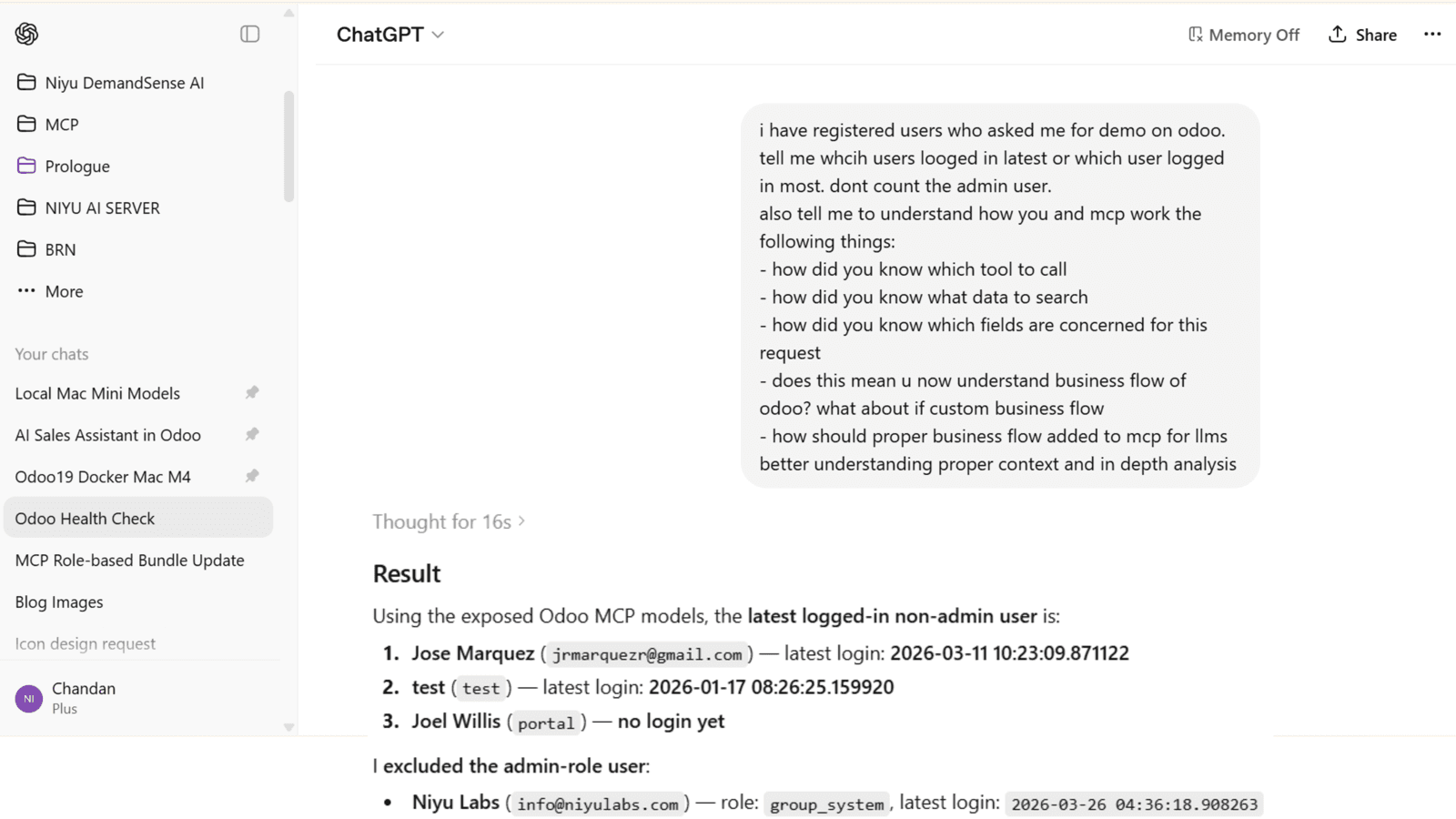
Business glossary
Customer resolves to res.partner, invoice to account.move, RFQ to purchase.order, transfer to stock.picking.
Instance playbook
Add your own rules, custom modules, field meanings, and approval flows so answers match how your team works.
Question resolver
Plain-language questions map to likely models, fields, and filters, with a note on anything ambiguous before it runs.
Model guidance
Per-model business terms, prompt hints, and safe field metadata help clients work with fewer mistakes.
What it can do
From a question to a dashboard to a whole new module.
This is not a read-only toy. The server exposes a deep, governed tool surface, and the client only ever discovers the tools your permissions allow.
Find anything
Search, read, browse, and count across live records without touching SQL.
Analyze in place
Grouped, pivot, time-series, top-N, funnel, and cohort analysis on live data.
Act, when allowed
Create, update, delete, and post to chatter, in batches, only where you permit it.
Export at scale
Governed CSV, JSON, and XLSX exports, plus async jobs up to 5,000 rows.
Build dashboards
AI assembles KPI, bar, line, pie, and table dashboards you can share by link.
Ship safe modules
The Safe Module Builder scaffolds real x_ models, fields, views, and menus from a prompt.
Plus discovery and identity tools, prompt templates, and Odoo resources. Over 40 governed tools in all, discovered dynamically per client.
Flexible permissions
You decide exactly what AI can touch.
Read-only on day one. Everything beyond that is a deliberate choice. Try it: change the preset and watch the tools the AI can see change with it.
Tools the AI can discover
10 of 17
The default on every new install. The client never even sees the tools you switch off.
Six checks on every single request
Credential scope
The OAuth token or scoped API key allows only the operations you granted it.
Odoo ACLs & record rules
Normal Odoo security still applies. The server never goes around it, only narrows it.
Data-access mode
Use each user's own Odoo access, or restrict strictly to assigned access bundles.
Bundle permission
Per-model presets: no access, read-only, read + update, create, or full CRUD.
Field rules
Allowlists, blocklists, and automatic filtering of passwords, tokens, and payment fields.
Domains & limits
Forced record domains, per-model row ceilings, rate limits, IP allowlists, and tool blocks.
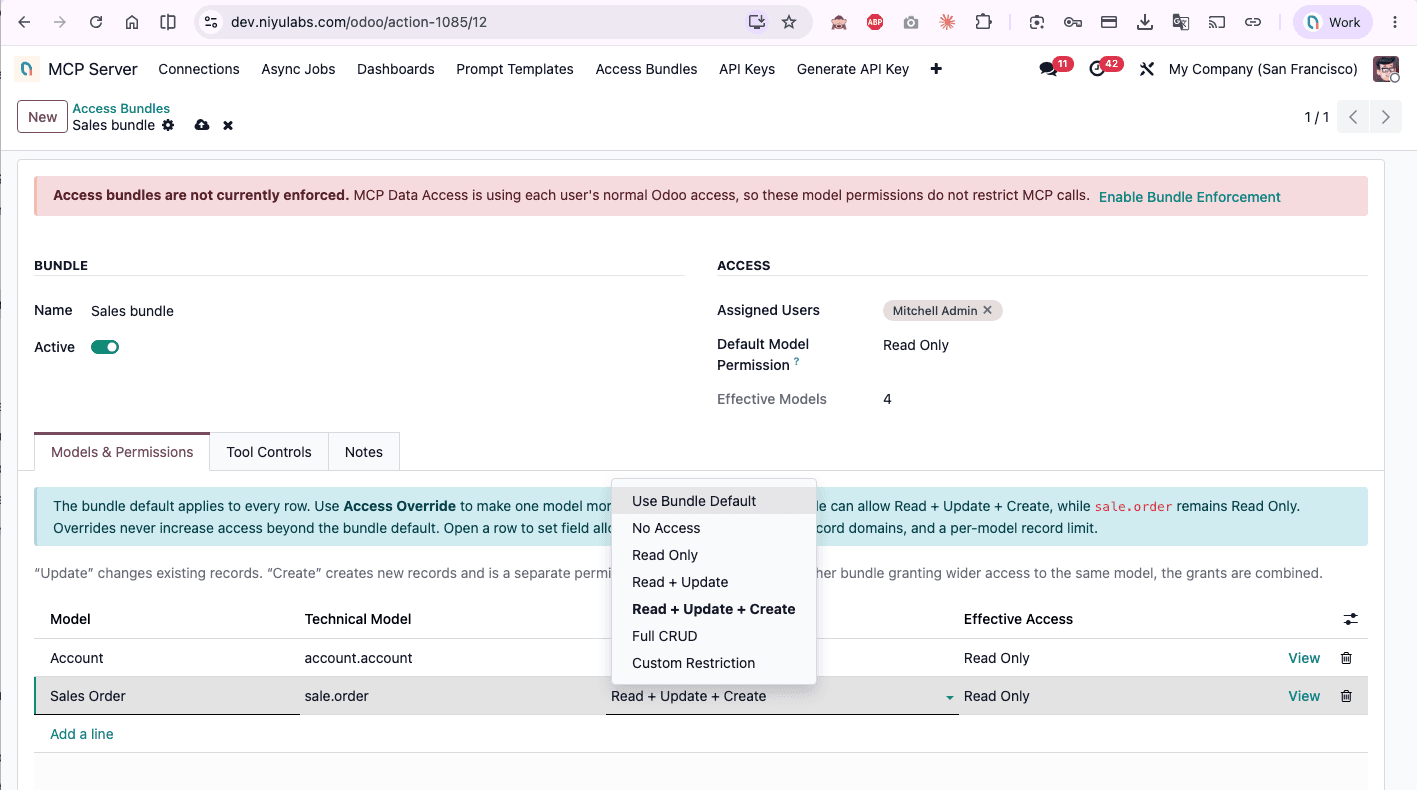
Precise, per-model permissions
Give every model in a bundle its own preset: read-only, read + update, create, or full CRUD. Overrides only ever narrow access, never widen it, and each row can set allowed fields, a forced domain, and a record limit.
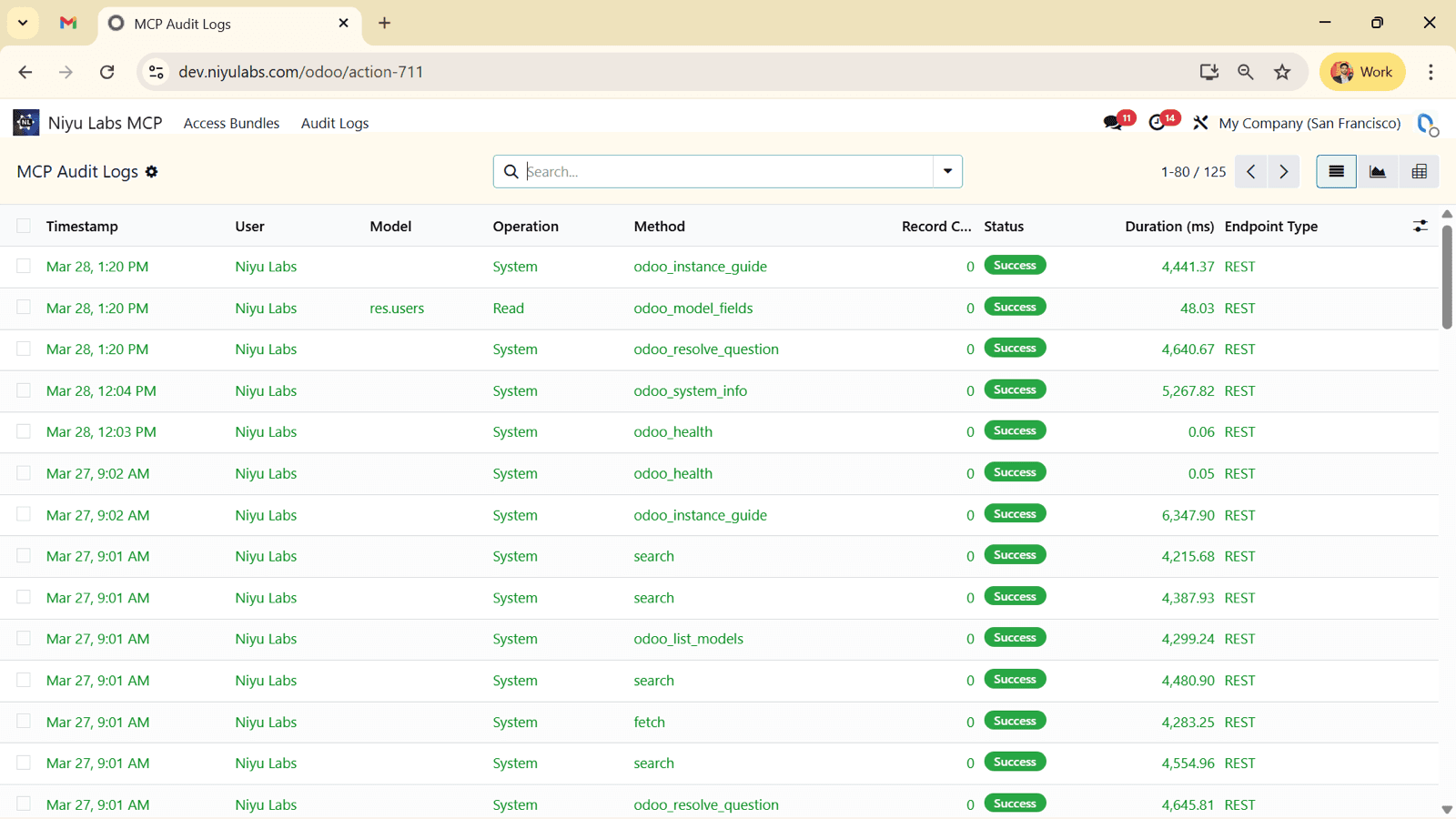
Every call, on the record
Successful, denied, and failed requests all land in the audit log with the user, tool, model, record IDs, status, IP, and duration. Disable any connection the moment it looks off.
Connect your AI clients
Bring your own model.
OAuth for people, scoped API keys for automations. The same governed endpoint serves every client, hosted or local.
+ Claude Code · VS Code · Gemini CLI · n8n · LangChain · crewAI · any MCP client
Connect ChatGPT to Odoo
Paste the endpoint, sign in through OAuth, and ask as your own Odoo identity.
Connect Claude to Odoo
Add a custom connector, complete the Odoo login, and use the same governed tools.
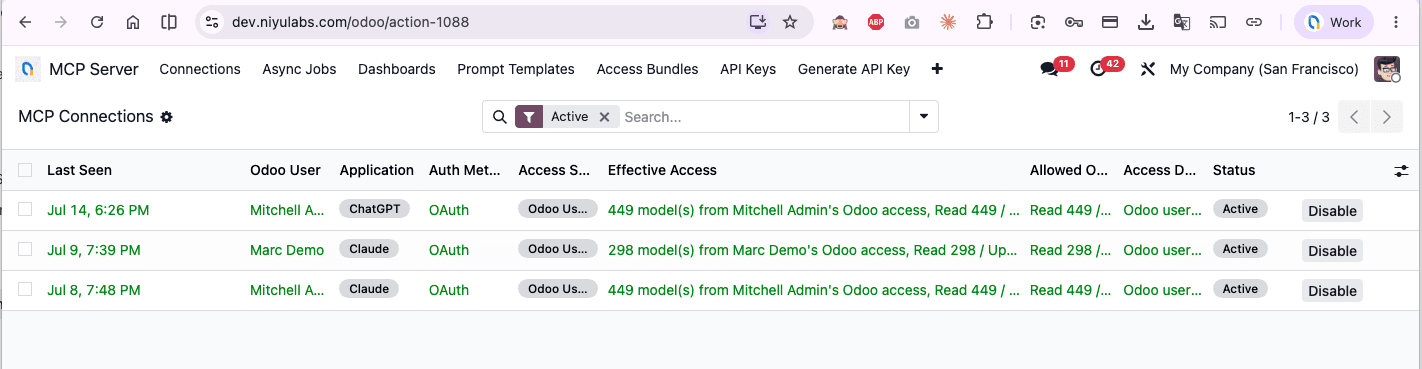
Every client, managed from Odoo
See who is connected (ChatGPT, Claude, and more), which Odoo user each runs as, and exactly what it can reach.
Two ways to authenticate
OAuth 2.1 + PKCE for interactive clients, so each person acts as their own Odoo user with dynamic registration and short-lived tokens.
Scoped API keys for automations, with per-key scopes, expiry, rate limits, IP allowlists, and one-click rotation.
Copy the config from Odoo
OAuth clients need only the URL. For a service, add an Authorization: Bearer scoped key. A local STDIO bridge is available for localhost development.
Scoped keys with their own roles and permissions
Each API key runs as a chosen execution user with only the scopes you grant, for example a read-only odoo.read key, plus optional expiry, IP rules, and one-click rotate or revoke.

Get started
Live in an afternoon.
No middleware, no rewiring. Install the module, scope access, and connect your first client.
Install the module
Drop niyu_mcp_server into your Odoo addons, restart, and install it from Apps. Works on Odoo 16 through 19. No external service to host.
Turn on /mcp and scope it
Enable the endpoint, choose OAuth or scoped keys, and pick the apps and models an AI client is allowed to see.
Connect your AI and ask
Paste the URL into ChatGPT, Claude, or Cursor, sign in through Odoo, and ask your first question.
Every request runs as a real Odoo user, passes each governance check, and lands in the audit log. Nothing runs that you have not allowed.
Simple price
One price. Unlimited users.
Buy it once and connect your whole team. No subscription, no per-seat maths, no surprise renewals.
- Unlimited MCP users, no per-seat fees
- Runs inside Odoo 16 to 19, no middleware to host
- Free installation support to get you connected
- Read-only by default, fully audited
Want a tailored rollout: custom bundles, agent workflows, or a setup across companies? Our team handles paid implementation. Rich step-by-step docs are included, with more on the way.
Need help choosing, or a custom setup? Talk to us or book a call.
Questions teams ask before buying
Which AI tools does it work with?+
Any client that speaks the Model Context Protocol. ChatGPT, Claude, Cursor, Codex, Gemini, Claude Code, VS Code, n8n, LangChain, and crewAI all connect to the same governed /mcp endpoint. Point your model at the URL and go.
Does the AI get full access to my Odoo?+
No. Every new install is read-only. Create, update, and delete tools appear only when the execution user, Odoo's own access rights, and the access bundle all allow the operation. You expose exact apps and models, and nothing else is ever reachable.
Do I need to know technical Odoo model names?+
No. A built-in glossary maps business words to models, so 'invoice' resolves to account.move and 'RFQ' to purchase.order. Pick the apps you want to expose; drop to model names like sale.order only when you want to fine-tune.
Can AI really build an Odoo module?+
Yes. The Safe Module Builder turns a prompt into a real, data-only module: custom x_ models, fields, views, menus, and access rules, packaged as an installable ZIP with a checksum. It never generates executable Python or JavaScript, so it stays safe.
How many users can connect?+
Unlimited. It is a one-time module purchase with no per-seat licensing. Assign the MCP role to as many Odoo users as you like, each connecting as their own identity through OAuth.
Which Odoo versions are supported?+
Odoo 16, 17, 18, and 19, in both Community and Enterprise. You install the build that matches your version so the server stays native to your instance.
Does it need a separate cloud service?+
No. The MCP server runs natively inside Odoo at /mcp over Streamable HTTP. No middleware to host. An optional local bridge exists for developers who want a localhost STDIO connection.
Is every request logged?+
Yes. The audit log records the user, client, tool, model, operation, record IDs, status, IP, duration, and timestamp for successful, denied, and failed calls. Connections show who is linked and what they can reach.
What does it cost, and is there support?+
A one-time $119, no subscription. Installation support is free; we will help you get connected. If you want a tailored rollout, our team offers paid implementation.
The rest of the AI layer for Odoo
The MCP server pairs well with the rest of what we build for Odoo teams.
AI Demand Forecasting
Forecast demand from your Odoo sales history and get buy and transfer suggestions before you stock out.
Learn more→AI ServicesCustom AI for Odoo
Need a tailored agent, pipeline, or rollout? Our team builds and implements AI on your Odoo instance.
Learn more→AI AnalystAsk Odoo in Plain English
A chat analyst that answers questions over your Odoo data without writing a line of SQL.
Learn more→Turn Odoo into an AI workspace your whole team can talk to.
Connect any AI, expose only what you approve, and audit every call. One-time $119, unlimited users, free installation support.