Blog
Odoo Reordering Rules vs Demand Forecasting: When Min/Max Stops Working
June 8, 2026
Learn when Odoo min/max reordering rules are enough, when demand forecasting is needed, and how to improve replenishment without replacing Odoo purchasing.

If you run purchasing in Odoo, reordering rules are usually the first serious upgrade from spreadsheet planning. You set a minimum quantity, a maximum quantity, quantities such as multiples if needed, and the replenishment route. Vendor and lead time usually come from the product, supplier, and route configuration around the rule. Odoo watches stock levels and suggests procurement when a product drops below the threshold.
That works well when demand is steady. It starts to break when demand moves in patterns.
The mistake is treating reordering rules and demand forecasting as competitors. They are not. Reordering rules are the execution layer. Forecasting is the planning layer. A good inventory process uses demand review to decide what the rules should be, then lets Odoo execute the purchase flow.
In plain terms: reordering rules decide when Odoo should suggest replenishment. Forecasting helps decide whether the thresholds and replenishment quantities still make sense.
This article explains where Odoo reordering rules are enough, where they become risky, and how to add demand forecasting without replacing the parts of Odoo that already work.
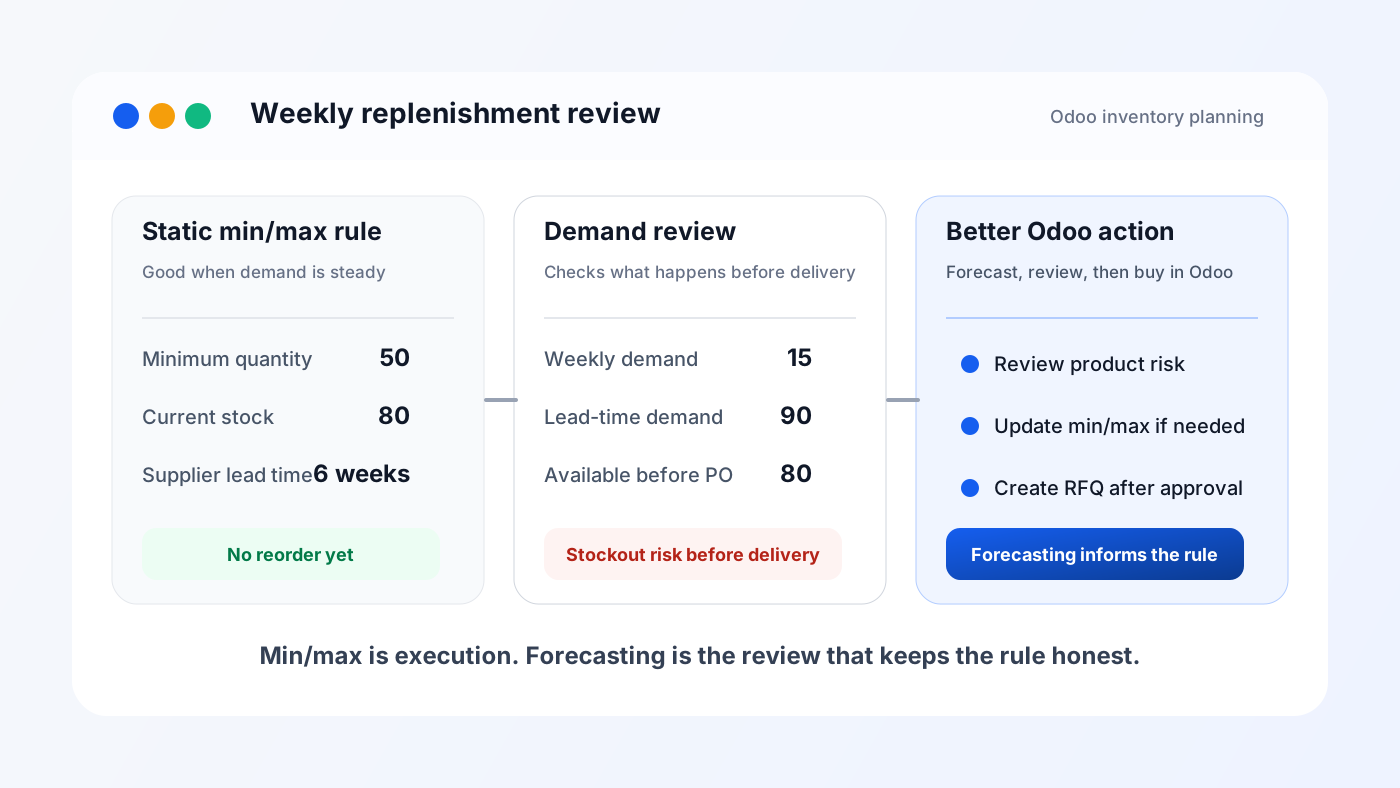
A simple inventory example: current stock may look safe under a min/max rule, while lead-time demand shows the product will run out before the next purchase order arrives.
Quick answer
Use Odoo reordering rules when a product has stable demand, stable lead time, and predictable supplier behavior. Add demand forecasting or structured replenishment review when demand changes by season, customer type, warehouse, promotion, project cycle, or sales trend.
For many Odoo businesses, the practical answer is not to abandon min/max rules. The better answer is to review and update those rules using demand data, stock movement history, lead time, and warehouse-level risk.
Odoo can then keep creating RFQs, replenishment suggestions, and purchase flows in the normal way.
What Odoo reordering rules actually do
A reordering rule is a safety mechanism. It tells Odoo what to do when the available quantity of a product falls below a defined level.
In a typical setup, the rule contains:
- Product
- Warehouse or location
- Minimum quantity
- Maximum quantity
- Multiple quantity, if you buy in packs or cartons
- Vendor and vendor lead time
- Route, usually buy or manufacture
When the forecasted quantity goes below the minimum, Odoo can suggest replenishment. Depending on the route and configuration, that may lead to an RFQ, a manufacturing order, or an item in the replenishment flow.
This is useful because the purchasing team does not need to manually scan every product every morning. Odoo can surface what needs attention.
But the rule only knows what you told it. If the min and max values are wrong, Odoo will execute the wrong plan very efficiently.
That is the quiet problem.
Where min/max works well
Reordering rules are excellent for boring products. Boring is good in inventory planning.
Min/max works well when:
- Weekly or monthly sales are stable
- Lead time rarely changes
- Supplier fill rate is reliable
- The product is not heavily seasonal
- One warehouse handles most demand
- Substitutes are not a major issue
- Demand is not driven by campaigns or project orders
Example: a spare part that sells 20 to 30 units every month, with a supplier who usually delivers in 7 days. A simple rule may be enough. Keep 20 units as the minimum, replenish up to 60, review once a quarter.
For this type of product, advanced forecasting may add unnecessary complexity. The rule is simple, the business risk is low, and the buying decision is obvious.
Where min/max starts to fail
Min/max becomes dangerous when old averages stop describing the next few weeks.
The failure usually shows up in one of two ways.
First, stockouts. The rule says you are safe, but a demand spike arrives before the next purchase order lands. Sales teams blame purchasing. Purchasing blames the forecast. Operations starts keeping emergency stock in random places.
Second, overstock. The rule keeps buying because the minimum quantity was set during a high-demand period. Demand has slowed down, but Odoo keeps protecting an old assumption. Cash gets tied up in inventory.
Common triggers:
- Seasonal products
- Fast-growing or declining SKUs
- New products with little history
- Products tied to projects or tenders
- Imported goods with long lead times
- Multiple warehouses with uneven demand
- Supplier delays or partial deliveries
- Sales campaigns that distort normal demand
- Products with high carrying cost or expiry risk
In these cases, the problem is not Odoo. The problem is static planning.
The planning question min/max cannot answer
A reordering rule answers this question:
When stock falls below X, how much should we buy?
Demand forecasting answers a different question:
What is likely to happen before the next replenishment arrives?
That second question matters more as the business grows.
Suppose a product currently has 80 units in stock. The minimum is 50. On paper, nothing needs to happen yet.
But if the product sells 15 units per week and the supplier lead time is 6 weeks, the business is already exposed. By the time the purchase order arrives, expected demand may consume 90 units. The reordering rule waits too long because the threshold is not connected to the future demand window.
That is where forecasting becomes practical, not theoretical.
A simple way to think about it
For each product, ask four questions:
- How much demand should we expect during supplier lead time?
- How much extra buffer do we need for uncertainty?
- How much stock is already available, incoming, or reserved?
- Is the risk of stockout worse than the risk of overstock?
The minimum quantity should usually protect lead-time demand plus some safety stock. The maximum quantity should avoid buying far beyond what the business can sell or use.
This is the point where many Odoo teams fall back into spreadsheets. They export stock moves, sales, purchase orders, and warehouse data, then rebuild the planning logic outside Odoo.
That can work for a while. It also creates version confusion, stale files, and buying decisions nobody can audit later.
What to check before adding forecasting
Before adding any forecasting tool, clean up the basics. Forecasting on bad inventory data just produces expensive nonsense.
Check these inside Odoo first:
- Are product routes correct?
- Are vendor lead times maintained?
- Are purchase units of measure correct?
- Are stock locations clean, or are teams using adjustment locations as hiding places?
- Are incoming shipments confirmed on time?
- Are cancelled orders and old reservations cleaned up?
- Are warehouses configured separately where demand is actually separate?
- Are products grouped by behavior, not just by category name?
If these are messy, fix them first. A forecasting layer cannot rescue broken operational discipline.
Segment products before changing rules
Do not apply the same planning method to every SKU.
A practical segmentation looks like this:
- Stable fast movers: keep simple min/max, review frequently
- Volatile fast movers: use forecast-assisted min/max
- Slow movers: avoid automatic replenishment unless critical
- New products: use manual review until enough history exists
- Long-lead imported products: plan using lead-time demand, not current stock only
- Expensive products: bias toward approval workflows and smaller buffers
- Critical spare parts: accept higher safety stock if downtime is expensive
This matters because inventory planning has trade-offs. A product that costs ₹500 and sells daily does not need the same rule as a ₹75,000 component that sells twice a year.
If the planning method ignores that difference, the purchasing team will either over-buy everything or under-protect the products that actually hurt the business.
How forecasting should fit into Odoo
The cleanest setup is not a separate planning universe. It is a feedback loop.
A useful forecasting workflow should:
- Read Odoo inventory, sales, purchase, and warehouse history
- Estimate future demand by product and warehouse
- Compare expected demand against stock on hand, incoming stock, and lead time
- Flag products at risk of stockout or overstock
- Recommend updated min/max values or replenishment quantities
- Let the purchasing team review before creating RFQs
- Keep the final buying workflow inside Odoo
That last point matters. For teams that want this review inside Odoo, the Niyu Smart Stock setup guide shows the product direction: stock risk, product health, and replenishment review before purchasing. Buyers already work in Odoo. Vendors, RFQs, purchase orders, receipts, and accounting links already live there. A forecasting tool should reduce bad decisions, not force the team to run procurement from another dashboard.
Warehouse-level forecasting is often the missing piece
Company-level stock can lie.
You may have 500 units across all warehouses and still stock out in the warehouse that serves the customer. Reordering rules can be configured by warehouse, but many teams still review demand as if all stock is equally available everywhere.
That creates costly outcomes:
- One warehouse over-buys while another runs out
- Transfers happen too late
- Purchasing sees enough total stock and misses local shortages
- Sales teams promise delivery from the wrong location
For multi-warehouse businesses, demand forecasting should be checked at warehouse level wherever possible. A basic warehouse-level forecast is often more useful than a company-wide average when fulfillment is location-sensitive.
When native Odoo is enough
Native Odoo is enough when the team can confidently answer these questions with the current Odoo configuration, reports, and operating process, without exporting to spreadsheets:
- Which products need replenishment this week?
- Which products are likely to stock out before the next supplier delivery?
- Which products are overstocked based on recent movement?
- Which warehouse has the risk?
- Which vendor delay is driving the risk?
- Which suggested purchases should be reviewed by a manager?
If the team can answer these inside Odoo, keep the system simple. Complexity is not a badge.
Use Odoo's built-in replenishment and reordering workflows, keep rules updated, and schedule regular review.
Odoo's own reordering rules documentation is the right starting point for the native workflow.
When you need a forecasting layer
You probably need a forecasting layer when the buying team says things like:
- We update min/max manually but nobody trusts the numbers
- We know the rule is wrong only after a stockout happens
- We buy extra because supplier lead time is unpredictable
- We cannot see stockout risk by warehouse
- We have too many SKUs to review manually
- Managers need to approve replenishment suggestions before RFQs are created
- Sales trends changed but the rules still reflect last quarter
- Slow-moving stock is tying up cash but the system keeps suggesting buys
These are not reporting problems. They are planning problems.
A report tells you what happened. A useful forecasting workflow tells you what to review before the next purchasing decision.
A practical weekly review process
If you want to improve inventory planning without a giant implementation project, start with a weekly replenishment review.
Every week, review:
- Products forecasted to stock out within lead time
- Products below minimum quantity
- Products with high demand growth
- Products with falling demand but active replenishment rules
- Products with incoming POs that arrive too late
- Products over maximum quantity
- Products with no movement for 60, 90, or 180 days
For each product, decide one action:
- Keep rule unchanged
- Increase minimum quantity
- Reduce maximum quantity
- Create RFQ
- Delay purchase
- Transfer between warehouses
- Disable automatic replenishment
- Send to manager review
This is how forecasting becomes useful. It changes a purchasing decision.
Where Niyu Smart Stock fits
Niyu Smart Stock is built for teams that want this review inside Odoo instead of another planning spreadsheet.
The goal is practical: help teams review stock risk, product health, forecasted demand, and replenishment suggestions before creating draft RFQs.
It is not meant to replace Odoo purchasing. It sits before the buying decision and helps the team decide which products deserve action.
If you are already using Odoo and want a cleaner replenishment review process, start with the Smart Stock setup guide.
If you want to discuss whether forecasting makes sense for your Odoo inventory setup, book a demo.
The owner-level rule
Do not add forecasting because it sounds advanced. Add it when the current buying process is producing expensive surprises.
If products are stable, min/max rules may be enough. If demand, lead time, or warehouse behavior changes often, static rules need help.
The right model is simple:
Forecast demand, review risk, update rules, create RFQs in Odoo.
That keeps Odoo as the system of record and uses forecasting only where it earns its place.